Pay for MoonCast IPTV — 3 Easy Methods
PayPal, Bitcoin (BTC), or USDC. Choose your method below and follow the steps — activation is instant after payment.
 PayPal
 Bitcoin (BTC)
 USDC
USDC
PayPal Friends & Family. We use PayPal Friends & Family to keep your transaction private and secure. No fees, no service details in the notes.
01
Choose your plan on the Pricing page
Go to the Pricing page, pick the plan that suits you, and click the buy button.
02
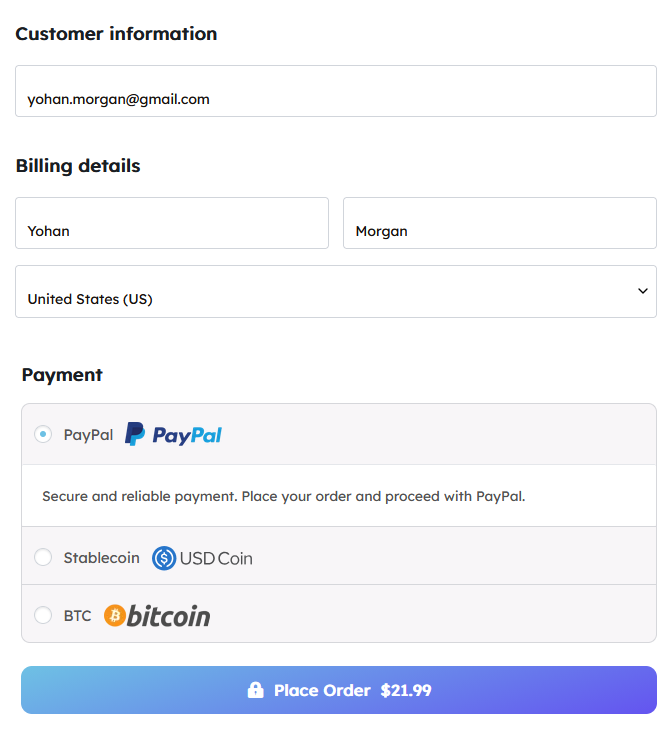
Enter your name and email at checkout
Fill in your name and email address — this is where your login credentials will be sent after payment.
03
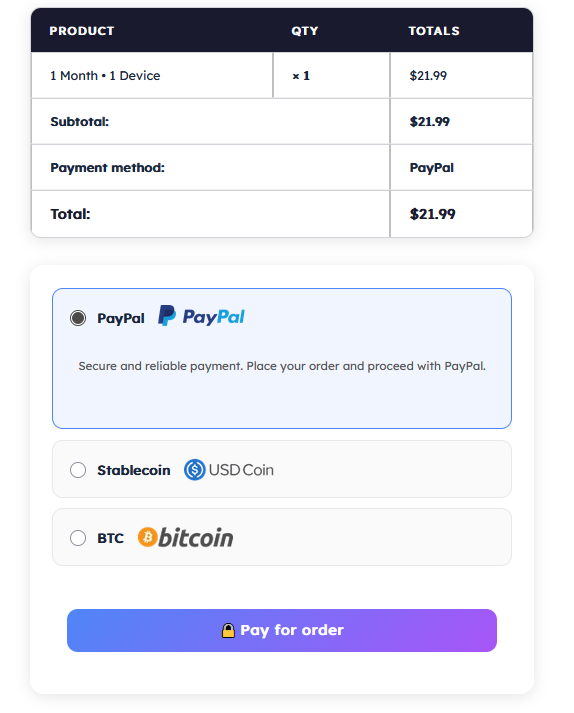
Select PayPal as your payment method
On the checkout page, select PayPal from the payment options, then click "Pay for order".
04
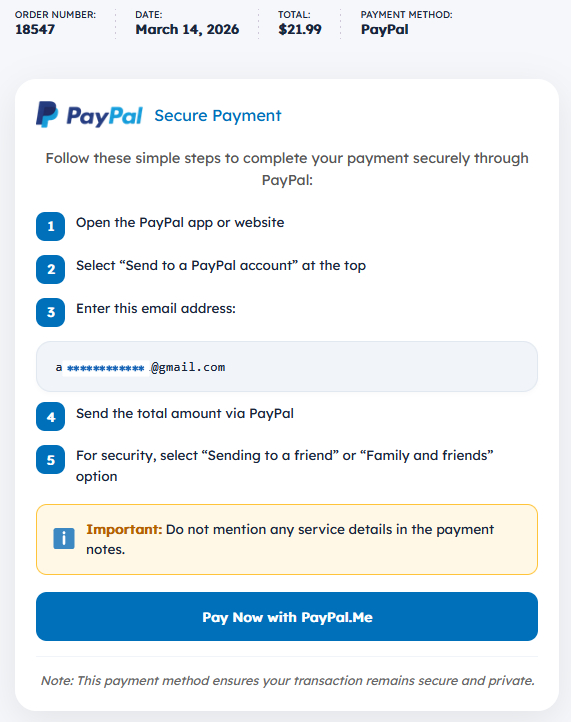
You land on the order confirmation page
After placing your order you'll see the PayPal payment instructions — including the email address to send to and the exact amount.
 PayPal app on this device?
 Not on this device?
PayPal app on this device?
Click the "Pay Now with PayPal.Me" button directly on the page — it opens your PayPal app and pre-fills the amount.
Not on this device?
No problem. We send you an email with a link to the payment page — open it on any device and complete the payment from there.
05
Send the exact amount — Friends & Family only
In PayPal, select "Send to a friend" or "Family and friends". Send the exact total shown. Do not mention any service details in the payment notes.
 Important: Do not mention any service details in the payment notes — this keeps your transaction private.
Important: Do not mention any service details in the payment notes — this keeps your transaction private.
06
Check your email for your login details
Once payment is confirmed, your MoonCast login credentials will be sent to the email you entered at checkout. Check spam if you don't see it within 15 minutes.
Make sure to send the payment as Friends & Family — this keeps your transaction private and free of fees.
Payment Details Sent!
After placing your order, we email you a unique Bitcoin address. Check your spam folder if you don't see it within a few minutes.
After placing your order, we email you a unique Bitcoin address. Check your spam folder if you don't see it within a few minutes.
01
Choose your plan and go to checkout
Visit the Pricing page, select your plan, enter your name and email, choose BTC as payment, and click "Pay for order".
02
We generate and email you a unique Bitcoin address
As soon as your order is placed, a unique BTC wallet address is generated for you and sent to your email instantly.
03
Open your email — copy the address or scan the QR code
Open the email from MoonCast. You'll find your unique Bitcoin address and a QR code. Copy the address or scan the QR code directly with your wallet app.
04
In your Bitcoin wallet, tap Send and paste the address
Open your Bitcoin wallet app, tap Send, and paste the address you copied from the email. Double-check it before confirming.
05
Enter the exact amount from your invoice
Enter the exact BTC amount shown in your email invoice. Do not round up or down — send the precise amount.
Security Note: Always verify the address and amount. MoonCast will never ask for your private keys. Bitcoin transactions are irreversible.
Security Note: Always verify the address and amount. MoonCast will never ask for your private keys. Bitcoin transactions are irreversible.
06
Confirm — access unlocks after 1 blockchain confirmation
Once your transaction gets 1 confirmation on the blockchain (normally 10–30 min), your MoonCast login details will be sent to your email automatically.
If it's been over 2 hours, contact support@mooncastiptv.com with your transaction ID and we'll activate your account manually.
Solana network only. USDC payments on MoonCast use the Solana network. Sending on any other network may result in permanent loss of funds.
01
Choose your plan and go to checkout
Visit the Pricing page, select your plan, enter your name and email, choose Stablecoin / USDC as payment, and click "Pay for order".
02
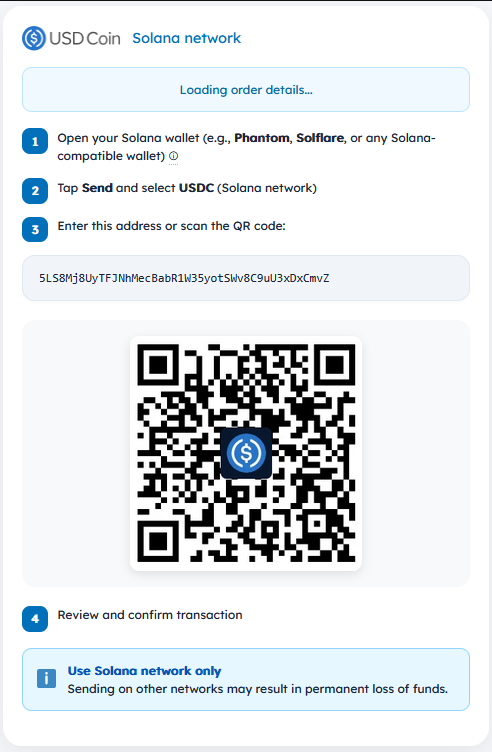
Open your Solana wallet
Open Phantom, Solflare, or any Solana-compatible wallet app on your device.
03
Tap Send and select USDC (Solana network)
In your wallet, tap Send, then select USDC. Make sure you are on the Solana network — not ERC-20 or any other network.
04
Enter the address or scan the QR code
On your order confirmation page you will see a unique wallet address and a QR code. Paste the address or scan the QR code directly with your wallet app.
 Use Solana network only. Sending on any other network may result in permanent loss of funds.
Use Solana network only. Sending on any other network may result in permanent loss of funds.
05
Review and confirm the transaction
Double-check the address and amount before confirming. Once sent, the transaction cannot be reversed.
06
Check your email for your login details
Once the transaction confirms on the Solana network, your MoonCast login credentials will be sent to your email automatically. Normally within 10–30 minutes. During busy periods it can take up to 1 hour.
If it's been over 15 minutes and you haven't received anything, contact support@mooncastiptv.com and we'll sort it out right away.
Common Questions
Normally you'll receive your login details within 10–30 minutes of payment. During busy periods, it can take up to 1 hour. If you haven't received anything after 1 hour, contact support@mooncastiptv.com and we'll sort it out right away.
Check your spam/junk folder first. If still nothing after 15 minutes (PayPal) or 2 hours (crypto), email support@mooncastiptv.com with your payment receipt or transaction ID.
Sending as Friends & Family keeps the transaction private and avoids unnecessary fees. It's the standard method for direct payments between individuals.
Yes. All plans include a 30-day money-back guarantee. If you're not satisfied, contact support within 30 days of purchase for a full refund.
Ready to Get Started?
Choose your plan, pay in minutes, stream instantly on any device.
View Plans and Pricing